What the platform is,
what travelling practitioners see,
what you control, and how introductions reach you —
before you decide anything.
How MyTrainingAtlas works for your school.
A lineage‑aware introduction system. Understand what travellers see before you decide anything.
How introductions work
The introduction system is built around your time. No login is required. You respond to introduction requests by email, with one click.
Step 1 — A traveller finds your school
They review your lineage, visitor policy, etiquette requirements, and schedule before deciding whether to approach.
Step 2 — They submit an introduction request
This includes their rank, lineage, home school, and proposed visit date. You receive everything you need to make a decision.
Step 3 — You receive an email
No login required. You approve or decline with one click. If you need to propose an alternative date or class, that option is available.
Step 4 — They arrive prepared
They know your etiquette, your schedule, and your requirements before they arrive. Misunderstandings are addressed before they reach the mat.
What travellers see
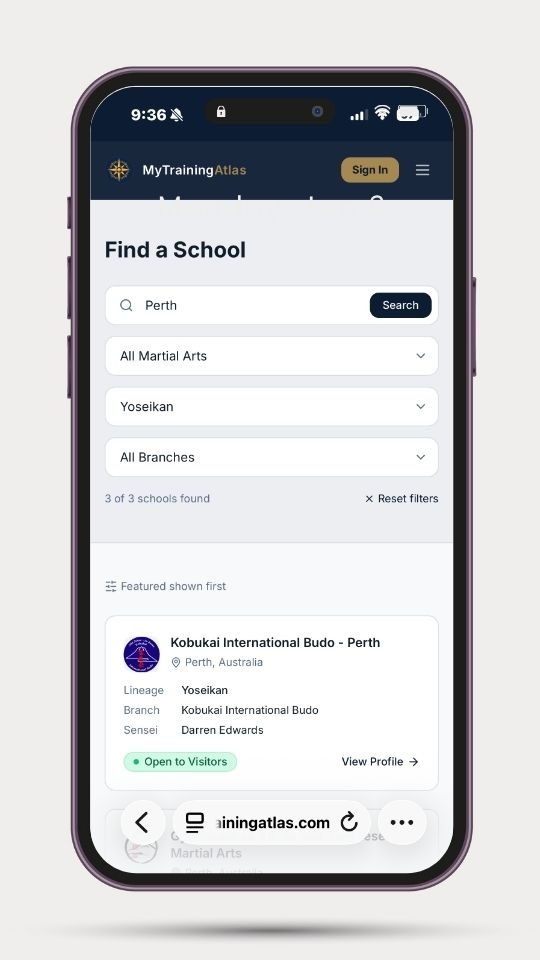
Travellers use the directory to understand lineage compatibility and visitor expectations before they reach out. A typical search looks like this:
A practitioner searches Perth
Selects Yoseikan as their Lineage Island
Sees schools in that branch with visitor policies shown
They can review schedule, etiquette requirements, minimum rank, and arrival instructions — all before sending an introduction request.

What you control
You control the information that represents your school. You set it once and update it when needed. The platform does not alter your information.
Identity and lineage
School name · Chief instructor · Art · Lineage Island · Branch · Teacher lineage path
Visitor policy
Whether you accept visitors · Minimum rank · Etiquette requirements · Equipment expectations · Arrival instructions · Maximum visitors per class
Practical details
Schedule · Address · Contact method · Training fees · Any notes you choose to provide
The platform captures only what a visiting practitioner needs to identify and approach your school appropriately. Nothing more. The goal is clarity, not marketing.
What you control
You control the information that represents your school. You set it once and update it when needed. The platform does not alter your information.
Identity and lineage
School name · Chief instructor · Art · Lineage Island · Branch · Teacher lineage path
Visitor policy
Whether you accept visitors · Minimum rank · Etiquette requirements · Equipment expectations · Arrival instructions · Maximum visitors per class
Practical details
Schedule · Address · Contact method · Training fees · Any notes you choose to provide
The platform captures only what a visiting practitioner needs to identify and approach your school appropriately. Nothing more. The goal is clarity, not marketing.

What this does not do
MyTrainingAtlas does not:
Rank or rate schools
Compare lineages
Display reviews
Require accounts or logins
Replace your existing website or communication channels
Replace your booking systems
It is an introduction system, not a marketing platform

What next?
Search for your school →
If your school is already listed, you can claim and update your listing. If it is not yet listed, you can add it. You can request removal at any time.